System Design Interview Walkthrough: Design Twitter

Tony Duong
Jun 3, 2026 ・ 4 min
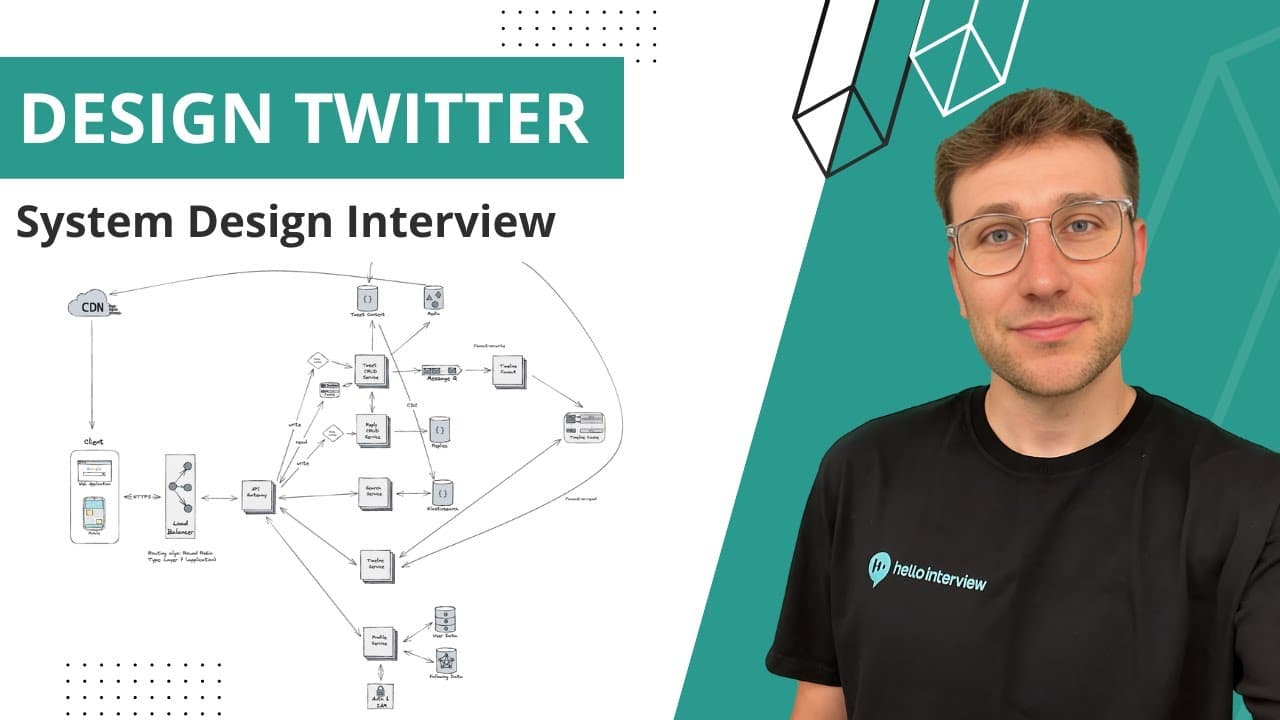
Notes from Hello Interview (former Meta staff engineer) on designing a Twitter-like microblogging service — one of the top system design interview questions at FAANG companies.
Requirements (keep under 5 minutes)
Functional
- Create account / login
- Create, edit, delete tweets
- Follow users
- View home timeline (tweets from people you follow)
- Like, reply, retweet
- Search tweets
Non-functional
- Scale to hundreds of millions of DAU
- High volume of tweet creates and reads
- 99.99% availability
- Security and privacy
- Very low latency for loading tweets
Scope deliberately excludes DMs, ads, integrity systems — 45 minutes, not 17 years.
High-level architecture
Client (web + mobile) → Layer 7 load balancer (round robin; content-based routing for rollouts) → API Gateway → microservices.
Standard trio present in ~90% of system design interviews: client, load balancer, API gateway.
Core services (map to functional requirements)
| Service | Responsibility |
|---|---|
| Tweet CRUD | Create/read/update/delete tweets, likes, retweets |
| Reply service | Replies (scaled separately for viral tweets) |
| Search | Tweet search |
| Timeline | Home feed generation |
| Profile | Accounts, profiles, follower graph |
| Auth (separate) | Authentication and authorization |
Tweet storage — why NoSQL
Twitter uses an internal NoSQL store (Manhattan). For the interview: MongoDB (or similar document DB).
Why NoSQL fits tweet workloads:
- Read/write heavy with very low latency — MongoDB is optimized for rapid, frequent reads and writes
- Tweet is a self-contained JSON document — user ID, text, timestamps, hashtags, mentions, location, media refs, likes, retweets — no complex joins when serving a tweet
- Fetch tweet = return one document
Media: store blobs in S3 (object storage); tweet document holds references only. Blob storage is built for large unstructured data and fast retrieval.
Timeline service — the interesting part
Fan-out on read (naive)
On timeline request: query followed accounts → fetch all their tweets → sort by time → return. Slow and expensive — fails low-latency NFR.
Fan-out on write (preferred)
When a user posts a tweet:
- Tweet goes to a message queue (buffer for bursts)
- Fan-out workers pull tweets, fetch author's followers
- Prepend tweet to each follower's timeline cache (Redis-like)
Next timeline read = data already prepared → lightning-fast reads. Trade-off: more write work, optimized for read speed (matches NFR).
Mega influencers (hybrid)
For accounts with millions of followers (Elon, Drake), fan-out on write could overwhelm the system. Hybrid:
- Average users: fan-out on write
- Mega influencers: fan-out on read — fetch celebrity tweets when follower opens timeline and merge with cached feed
Profile and social graph
| Data | Storage | Why |
|---|---|---|
| User profiles (username, email, bio) | SQL | Structured attributes, ACID, integrity, analytics joins |
| Follower / following graph | Graph DB | Natural fit for social networks; scales for recommendations and integrity later |
Auth isolated in its own service for security, maintenance, and third-party integration flexibility.
Search
Elasticsearch for full-text tweet search.
CDC (change data capture) from tweet document store → keeps search index in sync as tweets are created/updated. Same pattern as DDIA stream processing chapter.
CDN
Static assets and media served via CDN edge to clients for low latency globally.
Security (brief)
- AuthZ/AuthN via auth service
- HTTPS in transit; encryption at rest (often DB-native toggle)
- Rate limiting at API gateway (IP-based) + tweet/reply limits
- Input validation client + server (XSS, injection)
Monitoring and testing (brief)
- Prometheus + Grafana for health and metrics
- ELK stack for centralized logs
- Alertmanager / PagerDuty for incidents
- Load testing, CI (unit + integration), backup/recovery drills
When NoSQL is the right storage tool
The user's takeaway aligns with the video's design:
For read-heavy and write-heavy paths that need very low latency and simple access patterns (get document by ID, no joins), NoSQL document stores (MongoDB, Manhattan-style) are often the right choice.
Use SQL where you need relational integrity and structured queries (user profiles). Use graph DB for relationship-heavy data (followers). Use search engine + CDC for full-text. Use cache + message queue to optimize the hottest read path (timeline).
Key takeaways
- Clarify functional + non-functional requirements quickly, then move on
- Tweet CRUD → NoSQL document DB for high-throughput, low-latency read/write without joins
- Timeline → fan-out on write + per-user cache; hybrid for mega influencers
- Social graph → graph DB; user records → SQL
- Search → Elasticsearch fed by CDC
- Media → S3 + CDN; bursts → message queue
- Match storage to access pattern — don't default to one database for everything
